TimeMachineEditor

TimeMachineEditor
License:
Free
Language:
English
Developer:
Developer's website
OS:
Mac OS X
Updated:
See detailed info

Softonic review

Cyril Roger

“Change the backup interval in Time Machine”

by Cyril Roger about TimeMachineEditor

TimeMachineEditor lets you adjust the interval at which your Mac's Time Machine makes backups.

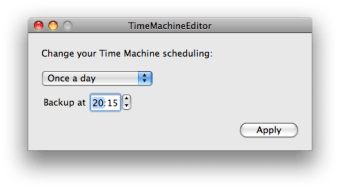
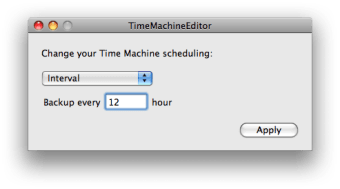
The default setup of your Time Machine is to make backups every hour, which is good for safety reasons, but may not necessarily suit you. Thanks to TimeMachineEditor, you can set your own interval, setting something like 12 or even more than 24 hours, if you don't want to have Time Machine working too often.

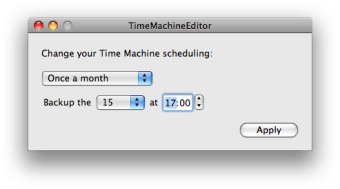
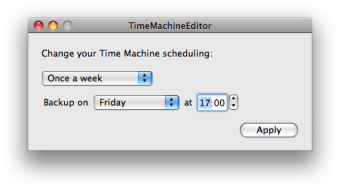
TimeMachineEditor can also let you set a precise time at which you want to carry out backups. Choose whether you want to be monthly, weekly or daily. You can type in a precise hour and choose the day of the week. TimeMachineEditor is easy to use and great if you want to control your own backups. However don't expect anything more from it. In all, it's a good complement on your Mac if you use Time Machine.

TimeMachineEditor is a specific application to tewak when your Time Machine performs backups.

Pros
  • Schedule precisely or by intervals
Cons
  • Limited to one function
Free Download TimeMachineEditor 2.5.3

TimeMachineEditor is virus free

We have analyzed the latest version of TimeMachineEditor with 30 antivirus engines and it is virus free. See analysis results.

TESTED VIRUS FREE - Softonic GUARANTEED

Developer's description

TimeMachineEditor is a software for Mac OS X 10.5 Leopard that lets you change the default one-hour backup interval of Time Machine. You can change the interval or decide to make a backup once a day, once a week or once a month.

This is usefull if you don’t need to backup every hour and don’t want the performance penalty. This is also especially usefull if you manipulate lots of data within one hour as you would spend the whole day backing up.

TimeMachineEditor merely updates a system configuration file to change the Time Machine scheduling. If you want to revert the change back to the original setting, you just need to apply a new schedule with an interval of one hour.

Once you have changed the scheduling, you can still use the Time Machine preference pane from “System Preferences” as you did before. However the preference pane won’t reflect your new scheduling, in particular the next backup date won’t be correct.

TimeMachineEditor (1) User reviews

  • Essential
  • 10/10
  • Simpan Simpan
    User reviews
    1

    TimeMachineEditor sets out with one goal, to give the user a way to change the very sparse default settings of the Time Machine. It does it with a simple, easy-to-understand user interface. It's ve... More

Your avatar
Review
  1. Maximum: 75 characters

  2. See example

Pros and Cons
Rate
  1. What rating would you give TimeMachineEditor?

    You need to fill in all fields

    • Usability:

      Not rated
    • Stability:

      Not rated
    • Installation:

      Not rated
    • Functionality:

      Not rated
    • Appearance:

      Not rated
    • Overall rating:

      Not rated
  2. Don't worry, we won't make your email address public.

You're not allowed to share serial numbers, cracks, etc. or link to pages that contain them. If you do, your user account will be deleted, your IP address logged and legal action will be taken.

Get started - just ask a question!

Write a title for your question.

Alternativesto TimeMachineEditor

  • In English:
    TimeMachineEditor
    TimeMachineEditor

    Change the backup interval in Time Machine

    Softonic rating:
    • 8/10
    User rating:
    • 10/10
  • Better rating:
    iAlertU
    iAlertU

    Alarm for your MacBook

    Softonic rating:
    • 9/10
    User rating:
    • 9/10
Compare with TimeMachineEditor
Download rank: Security & Encryption

13 of 55

Softonic rating:
  • Very good
  • 8/10
User rating: (3 ratings)
  • Essential
  • 10/10
Your rating:
Your rating
  • 0

Review and rate this program

Top Downloads: Security & Encryption

  • United States
  • Global

  1. MacKeeper

    All round optimizer and maintenance tool

  2. Little Snitch
  3. LockMeBaby
  4. SecuritySpy
  5. 1Password

Older versions of TimeMachineEditor

Reviews of TimeMachineEditor in other languages